.svg)
Beyond the Launch: How a Webflow Agency Sets Up Your Marketing Governance
What is Webflow governance, and how to achieve it.
.avif)
Introduction: The Enterprise Webflow Reality in 2026
Launching a new Webflow site is a milestone, but for enterprise organisations and fast-scaling startups, it is only the beginning. Once the "Go Live" champagne has been poured, a new set of challenges emerges: How do we maintain this? Who is allowed to change the hero section? How do we prevent a junior intern from accidentally reverting a critical SEO update?
In 2026, marketing teams are moving faster than ever. To keep pace, you need more than a website; you need a Marketing Governance Framework. At Paddle Creative, we specialise in moving companies beyond the "Agency Trap" – where you beg for updates – and into a model of empowered governance. This guide explores how a professional Webflow agency establishes guardrails that let your team scale without fear of a technical catastrophe.
1. What is Webflow Governance, and how is it different from Gatekeeping?
A Webflow agency sets up marketing governance by implementing role-based access, structured publishing workflows (such as Page Branching, available to Webflow Enterprise customers), and centralised Design Systems, implemented through custom Component builds. This framework ensures marketing teams can iterate at speed while protecting the site's technical integrity, accessibility compliance, and long-term performance.
Traditional agencies often "gatekeep" by holding the keys to the Designer. True governance does the opposite: it provides the keys but clearly marks the "safe" doors. Governance in Webflow involves three core pillars:
- Access Control: Who can enter the Designer vs. the Editor or Marketer role.
- Workflow Control: How changes are staged, reviewed, and pushed live.
- Design System Integrity: How we ensure new pages follow the "Source of Truth."
Paddle Creative Insight: Restricting Style Guide access isn’t about control – it’s about preventing "silent CSS debt" that compounds over time. Governance ensures your site remains as fast on day 500 as it was on day 1. Webflow is a remarkable platform, but it needs to be managed to maintain consistency.
The "Unbreakable" Build
When we hand over a site, we don't just hand over a login. We hand over a platform built with Guardrails. By utilising structured CMS fields and "unbreakable" components, we ensure that a marketer can change text, images, and layout orders without ever breaking the underlying CSS or Webflow accessibility standards for WCAG 2.2 AA compliance.
2. How do Webflow Agencies Prevent Accidental Publishing?
The biggest fear for a marketing manager is the "Global Publish." In a standard setup, hitting publish pushes every single change on the site live – even the half-finished ones.
Page Branching and Staging
For Webflow Enterprise clients, we implement Page Branching. This allows different team members to work on separate versions of a page simultaneously.
- The Workflow: A designer works on a new landing page layout while a copywriter updates the blog, and a developer refactors a footer component.
- The Governance: Nothing goes live until a "Lead Content Reviewer" approves the branch. This creates a clear audit trail and eliminates the risk of accidental rollouts.
Site Activity Logs
Governance requires accountability. We can set up Webflow's Site Activity logs for Webflow Enterprise customers, so you can see exactly who did what and when. This transparency is vital for maintaining GDPR and data compliance within marketing teams.
3. How Does Role-Based Access (RBAC) Work in Webflow?
Governance relies heavily on RBAC. Not everyone needs to be a "Workspace Admin." A typical governance setup includes:
- The Content Editor: Access only to the CMS and specific text/image fields. Zero risk to the design.
- The Marketer: Access to the Designer but restricted to "safe" components and page-building tools.
- The Lead Developer (Paddle Creative): Full access to the Style Guide, Custom Code, and Integrations.
4. Case Study: Gaia Fertility – Scaling with Governance
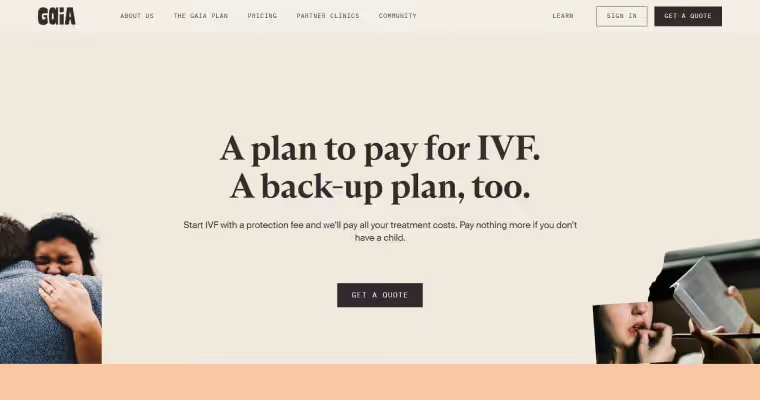
Governance is most critical when a brand is undergoing rapid international expansion and multiple stakeholders are involved.
The Challenge: After raising $30m in funding, Gaia Fertility needed a custom Webflow "experience" delivered on a tight three-week timeline. To move into the USA market, they needed a platform that all stakeholders could manage without compromising the unique visual rebrand.
The Outcome: Paddle Creative onboarded the Gaia team to a custom governance structure. This enabled their stakeholders to manage unique visual elements across different regions while maintaining technical integrity. We have supported Gaia for over 2 years, facilitating their successful USA launch while ensuring all work complied with relevant accessibility laws and regulations.
5. How do Agencies Prevent Technical Debt in Webflow?
Most enterprise sites don't break overnight; they "drift." We call this Governance Drift.
Paddle Creative Insight: Most governance failures we see happen 3–6 months post-launch, not on day one. That’s why we build proactive audits into every enterprise Webflow engagement to stop "drift" before it impacts performance.
How do we stop the drift?
- Class Audits: Every six months, we identify unused classes or "stray" styles.
- Asset Optimisation Review: We audit the Media Library to ensure uncompressed assets aren't tanking your performance.
- DOM Depth Check: We refactor complex sections to keep the site's "Technical Weight" low.
6. How do Teams Adopt Webflow Governance Successfully?
The Paddle Creative Handover Protocol ensures the human side of governance is as strong as the technical side:
- Custom Video Documentation: We record bespoke videos of your actual CMS and Components.
- The "Sandboxing" Phase: Before full handover, we give your team a staging environment to "try to break" the site.
- Onboarding SOPs: We provide a Standard Operating Procedure (SOP) library of training ‘SOP’ videos for new hires.
7. Integration Governance: Protecting the Data Stack
If a marketer changes a form field ID in Webflow, it can break the sync to your CRM (HubSpot, Salesforce, etc.). We govern API keys and provide a clear Mapping Document that specifies which Webflow CMS fields correspond to which CRM properties. This ensures your website remains a reliable data source and stays within UK GDPR laws.
8. Strategic Comparison: Traditional vs. Governed Webflow
Conclusion: Empowered Teams, Unbreakable Sites
Beyond the launch, your success depends on how well you manage your platform. A robust Webflow governance framework removes the "fear factor" for CMOs and empowers marketing teams to be truly agile.
Ready to move beyond the launch and secure your marketing governance? Book a Call with Paddle Creative today.

%20(1)%20(1)%20(1).avif)
.avif)
%20(1).avif)
.avif)
.avif)