
.svg)
Webflow Technical Debt Explained: What It Is and How Agencies Fix It
That slow load time? That broken form? That's technical debt. We explain the hidden costs that cripple marketing agility and show you the non-negotiable process for a guaranteed, debt-free refactor.
.avif)
.avif)
- What it is: The accumulated cost of choosing quick fixes or shortcuts over clean, scalable code.
- The Analogy: It’s like a high-interest credit card, slowing down your site and raising the cost of every future update.
- Common Causes: Rushed timelines, relying on non-specialist developers, and prioritising aesthetics over CMS structure.
- The Cost: Lost revenue from poor SEO and AEO performance, wasted marketing time, and the inevitable, expensive rebuild.
- The Solution: A structured audit by a specialist agency that prioritises clean code (like Client-First) to guarantee scalability.
1. Introduction: Why Your Webflow Site is Slowing Down
That slow load time? That broken form integration that keeps failing? That's technical debt. And you're paying high interest on it every month, in the form of lost revenue, wasted developer time, and crippling marketing agility.
If you moved to Webflow to escape the complexity of WordPress, the last thing you want is a new site that immediately starts accumulating the same old problems.
Technical debt isn't just "bad code." It's the unforeseen future cost of choosing an easy solution now. The debt piles up invisibly until one day, the simple task of launching a new landing page becomes a week-long debugging nightmare.
In short, Webflow technical debt is the hidden cost of shortcuts that make your site harder to scale, slower to load, and more expensive to maintain. This guide provides the framework: we define Webflow technical debt, show you the non-negotiable red flags, and explain how a specialist Webflow agency pays down that debt to guarantee your future growth.
Ready for a guaranteed fix, not another quick patch? Book a strategic call with Paddle Creative to end your technical debt nightmare today. (Book a call)

2. What Exactly is Webflow Technical Debt?
Think of your Webflow site as a house. Technical debt is every quick fix, every messy wiring job, and every cheap material used to get the house built fast.
The house looks great on the surface. But when you try to add a new room (a new feature or landing page), you find the electrical system is a mess, the foundations are shaky, and the walls are filled with spaghetti code.
In Webflow terms, debt is anything that makes the code difficult to maintain, hard to scale, and slow to load, directly impacting the one thing you care about: marketing performance.
At Paddle Creative, we often take on Webflow projects with significant technical debt. The most obvious and common issue is a non-scalable class-naming system. This is why we use Client-First as our class-naming convention of choice. Add to this JavaScript issues, large image file sizes and poor technical setup. The issues we see are common inside Webflow projects. We often begin our engagement with partners by identifying issues and making a plan to remove this technical debt.
3. Not All Debt Is Bad: Intentional vs. Accidental Debt
Technical debt is often framed as a mistake, but in reality, there are two types:
- Reckless Debt (Bad Debt): This is unplanned, undocumented debt caused by rushing, laziness, or a lack of skill. It is the most common form and undermines scalability. (Example: Inconsistent class naming, poor image compression).
- Strategic Debt (Good Debt): This is debt taken on intentionally to meet a critical business objective, such as a proof-of-concept launch (MVP) or a tight campaign deadline. It is fully documented and has a clear plan to be "paid back" (refactored) later.
A great agency doesn't just eliminate bad debt; they help you define and manage strategic debt. We understand the need for a shortcut to launch, but we immediately create a plan to clean up the code once the market opportunity has been captured.
4. What causes technical debt in Webflow sites?
Most Webflow debt isn't intentional; it's a byproduct of poor process or rushed timelines. Here are the most common ways it creeps into your project:
A. The Rushed Build (Intentional Debt)
You need to hit a deadline, so your developers take shortcuts. They hard-code specific elements, avoid using components, or skip setting up a consistent Design System. You get the site on time, but every future update will be slow and expensive.
B. Relying on Non-Specialists (Unintentional Debt)
Webflow is easy to use, but hard to master. When a site is built or maintained by a generalist or a junior team, they often create overly complex, nested, or poorly named classes. This makes the project messy and impossible for your content team to scale.
C. Bloated Custom Code
The moment you start pasting un-audited JavaScript or CSS into the <head> tag to force a function, you're taking out a loan. Third-party scripts, embedded apps, and custom interactions that aren't properly optimised are the cost you pay in slow load times and security vulnerabilities.
D. CMS & Asset Neglect
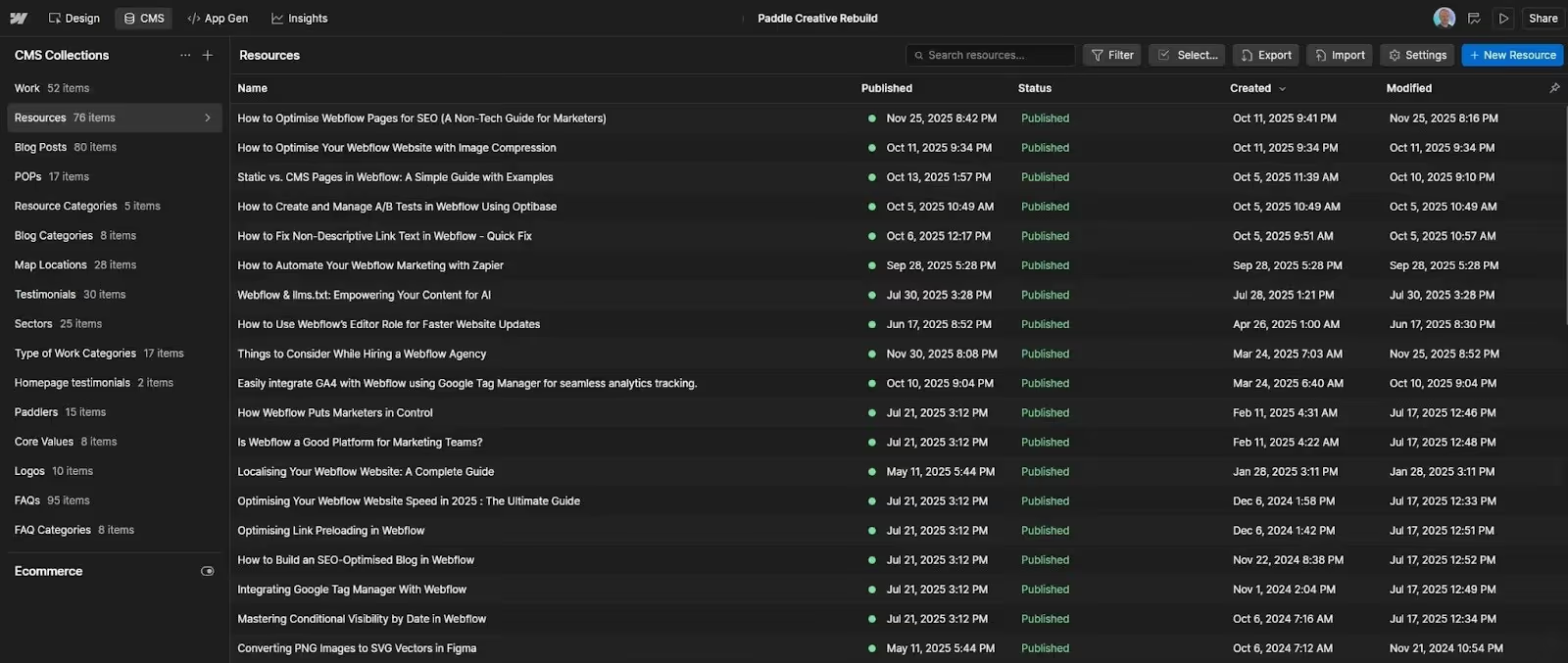
Your CMS is your biggest asset, but it can quickly become a technical liability. Debt here looks like:
- Duplicate collections or pages.
- Massive, uncompressed images (JPEGs instead of WebP).
- Inconsistent naming conventions in the CMS fields.
E. Lack of Component Use
Webflow Components make scaling and managing Webflow sites a breeze. We come across many Webflow sites that barely utilise Components or Variables at all. This is a missed opportunity and a technical debt, creating additional work to manage and scale the site in the future.
5. How does technical debt impact Webflow performance or SEO?
Debt slows you down. And in marketing, slow equals expensive. When you choose to ignore technical debt, you are accepting a tax on your business.
Paddle Creative Insight: Technical debt doesn't just create bugs; it kills momentum. Every time your marketing team is held up by a development bottleneck, you lose leads and revenue potential. That's the real cost.
6. How do I know if my Webflow site has technical debt?
The good news is that Webflow debt is measurable. You don't need to be a Webflow Expert to spot the red flags – you just need the right tools and process.
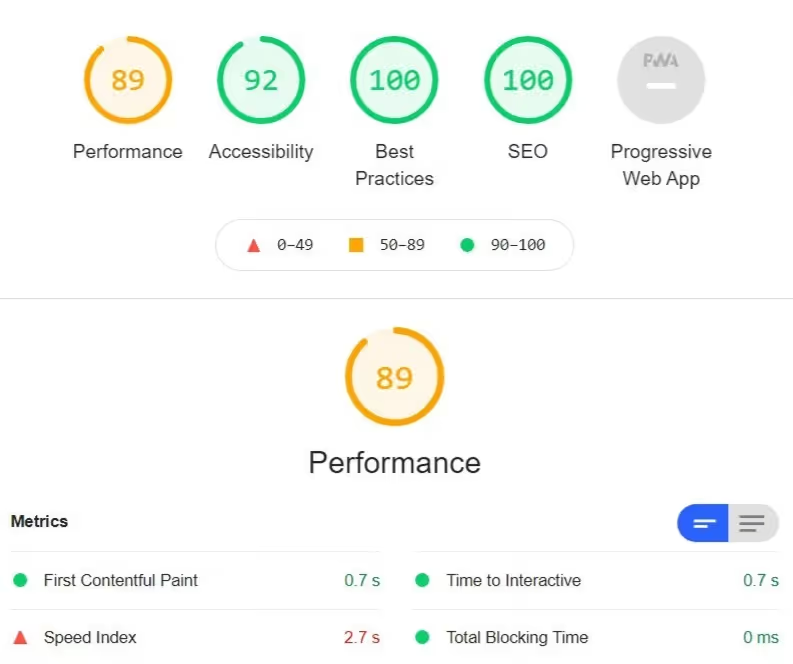
A. Run a Core Web Vitals Audit
This is the ultimate test. Use Google's PageSpeed Insights tool. Any score below 90 (yellow or red) is a direct measure of your technical debt. Debt impacts the metrics that matter most:
- Largest Contentful Paint (LCP): How fast your main content loads.
- Cumulative Layout Shift (CLS): How stable the site is while loading.
B. Check the Class-naming Convention Health
If your site was built correctly, every element should use a consistent class name. If you go into the Webflow Designer and see a long list of classes like Section 2, Heading-Copy 3, or div block 15, your site is saddled with debt.
C. Review the Third-Party Scripts
Look in your Webflow Custom Code settings. If you see numerous old, confusing, or undocumented scripts running on every page, that's debt. Scripts cost you load time and increase your security risk. Audit them immediately.
D. Ask the "Change" Question
Can your content team launch a new landing page by Friday using only the CMS structure and existing components? If the answer is "No" or "It needs a developer," you have high debt.
E. The Naming Convention Litmus Test: Clean vs. Chaos
Technical debt often hides in plain sight within the Webflow Designer. The cleanliness of the class naming convention is your clearest indicator of debt.
7. How can a Webflow agency fix or remove technical debt?
You can't pay down debt with the same approach that created it. A specialist Webflow agency provides the structured process and technical rigour required for a debt-free build.
- Implement a Clean, Scalable Framework: The first step is always standardisation. Paddle Creative uses the Client-First class naming convention. This is a non-negotiable standard that cleans up the entire site structure, makes it easy for any developer (internal or external) to understand, and guarantees future scalability.
- Full-Performance Refactoring: We attack the PageSpeed score head-on. This involves:
- Refactoring code to eliminate unnecessary nesting.
- Migrating all non-essential assets to next-gen formats (WebP or AVIF).
- Aggressively auditing and removing render-blocking custom code.
Paddle Creative Insight: GTMetrix is a great tool that provides deeper speed insights than PageSpeed Insights. You can audit your site with GTMetrix, export the details, and ask Gemini or ChatGPT for a non-technical breakdown of the issues.
- Structured Documentation and Handoff: Technical debt often comes from a lack of documentation. When we clear the debt, we provide a complete audit, custom training for your team, and full access. You own the clean site, not the headache.
Paddle Creative Insight: As part of our Paddle Promise, we aim to give you the keys to your website by training you through bespoke video tutorials that show your whole team how to manage your Webflow site. No gatekeeping.
- Proactive Maintenance Retainer: The best way to prevent future debt is to sign up for a proactive retainer. We perform continuous audits, monitor your Core Web Vitals, and handle all updates, ensuring the debt never piles up again. Take a look at our Webflow Maintenance service, and we can be your proactive team member to manage your Webflow website and remove the technical debt built up.
Paddle Creative Insight: We regularly rebuild sites where the design looked great, but the underlying structure made even simple updates fragile. In nearly every case, the core issue wasn’t Webflow – it was rushed builds or poor frameworks. Clean structure is the number one predictor of long-term performance.
8. Your Two-Step Action Plan to Eliminate Technical Debt
You know you have debt. The next step is a strategic intervention, not another quick fix. When you partner with us, this is our transparent, immediate process to stabilise your site and guarantee future performance:
Step 1: The Zero-Debt Diagnostic Audit (1 Week)
We start with a complete, non-invasive audit of your Webflow site. We audit every class, every script, and every CMS collection against the highest standards (like Client-First). We document all existing technical debt and provide you with a clear, quantified report showing exactly what is broken and why it's crippling your performance.
Step 2: The Refactoring & Scalability Guarantee (Phased)
Based on the audit, we develop a phased plan. We don't just patch things; we refactor the core structure. We clean up class systems, optimise assets, and implement a modular Component framework, so your marketing team can launch new pages in hours, not weeks. We guarantee a higher PageSpeed score and a debt-free foundation ready for growth.
Next Steps: Audit Your Debt. Plan Your Refactor.
Your Webflow site should be your greatest marketing asset, not your biggest technical liability. Stop suffering the hidden tax of technical debt.
Stop Guessing. Demand Guaranteed Performance.
Your Webflow site is a critical revenue asset. Book a strategic call with Paddle Creative to get your performance baseline and see how our managed service delivers predictable ROI – not just bug fixes.
Author
Fact Checked By

%20(1).avif)







.avif)


%20(1).avif)
%20(2).avif)
%20(1).avif)
.avif)
.avif)
%20(1).avif)
.avif)

.avif)
.avif)
.avif)
.avif)
%20(1).avif)
.avif)
%20(1).avif)

.avif)

%20(1).avif)
%20(1).avif)
%20(1).avif)











%20(2).avif)
.avif)


.avif)

.avif)
.avif)
.avif)
.avif)
.avif)
.avif)
.avif)
%2520(1).avif)
%2520(1).avif)
.avif)
%2520(1).avif)
%2520(1).avif)
%2520(1).avif)
%2520(1).avif)
%2520(1).avif)
%2520(1).avif)
.avif)
.avif)

.avif)


