
.svg)
Webflow’s New Client Seats & Edit Mode: A Simple Guide for Your Team
Webflow is replacing its legacy Editor with Edit Mode from May 2026. Here's what changes, what stays the same, and exactly what Paddle Creative is doing to manage the transition for you.
.avif)
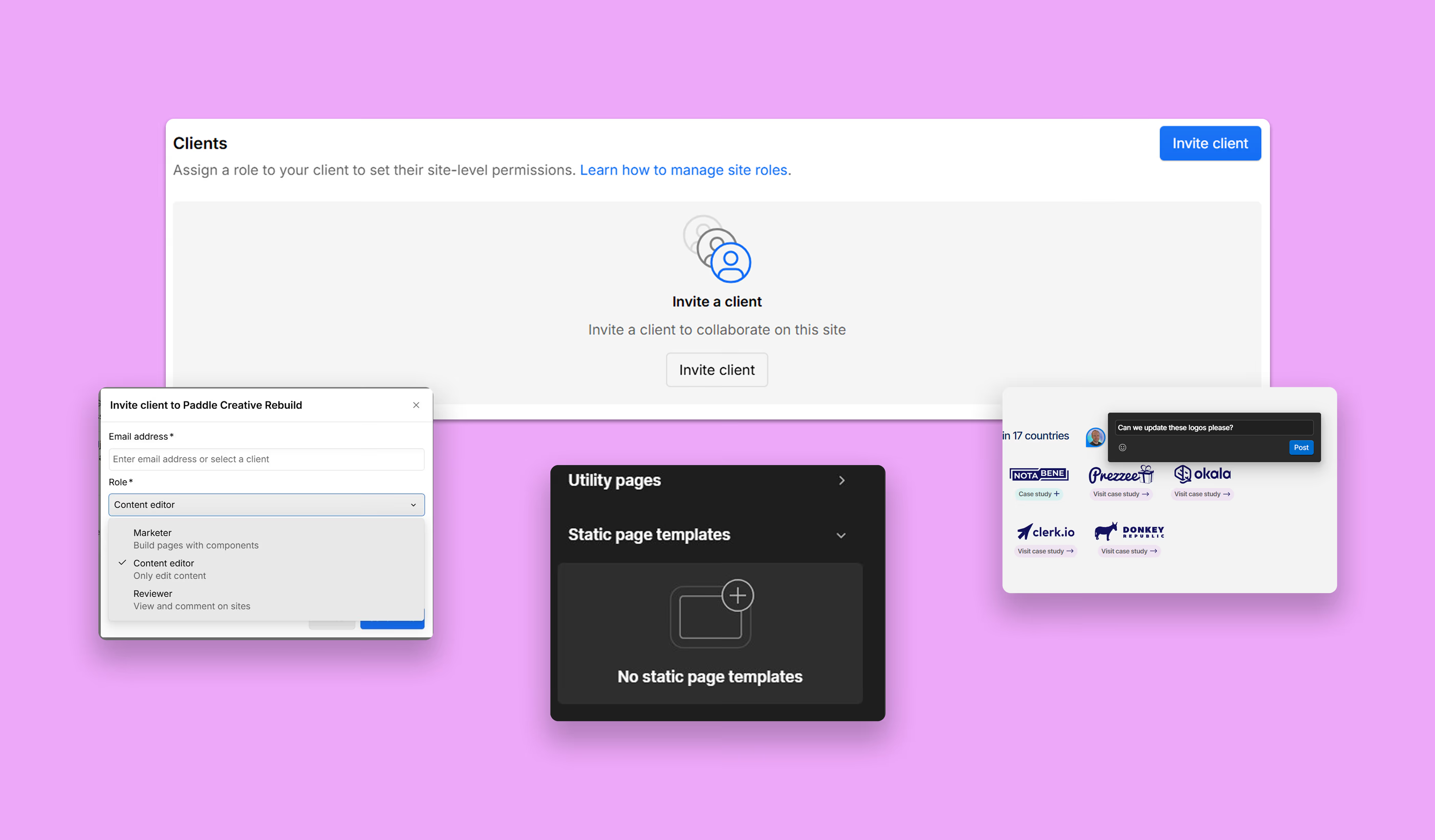
- The Change: Webflow is replacing the standalone "Legacy Editor" with a built-in Edit Mode.
- Automatic Migration: Starting May 4, 2026, existing users will be moved to a free seat automatically – no manual action required.
- Enhanced Tools: You gain a more stable experience with better asset management, real-time collaboration, and deeper SEO controls.
- Zero Risk: Your site design remains protected. We use "Design Guardrails" to ensure your team can edit content without ever breaking the layout.
1. Introduction
Webflow Edit Mode is replacing the legacy Editor - and it is a more significant change than it might first appear. Rather than a surface-level update, this is a fundamental shift in how content editing works within the Webflow platform: a new, integrated environment built directly into its core. This guide explains what is changing, why it matters, and how Paddle Creative is managing the transition on your behalf.
If you’ve been using the legacy Editor to update content, a significant transition is coming. By August 2026, the old Editor will be retired, replaced by a more powerful, integrated experience built directly into the core Webflow platform.
1.1 Quick Answer: What is replacing the Webflow Editor?
Webflow is replacing its legacy Editor with a new Edit Mode built directly into the platform. Starting May 4, 2026, existing users will be automatically migrated to free client seats and assigned the Content Editor role. This integrated system provides superior collaboration, asset management, and SEO controls without disrupting your ability to update content.
2. Webflow’s Editing Experience Is Changing – Here’s What It Means
Webflow Edit Mode replaces the legacy Editor by moving content editing out of an overlay layer and directly into the core Webflow platform. The result is a faster, more stable editing environment that supports real-time collaboration, improved asset management, and native SEO controls, without requiring any technical knowledge from your team.
For years, the legacy Editor was the go-to way for clients to update text and images. However, as web technology has advanced, that old "overlay" system reached its limits.
The new Edit Mode lives directly inside the core platform. For your marketing team, this means:
- A Smoother Experience: No more "clunky" layers; editing feels fast and native.
- Total Content Control: More flexibility in how you manage your media and pages.
- Seamless Collaboration: Work alongside your team (and us) in real-time.
Paddle Creative Insight: We’ve seen that the biggest frustration for clients was the "lag" between making a change in the old Editor and seeing it live. Because Edit Mode is built into the core engine, that friction is gone. It’s a faster, more reliable "What You See Is What You Get" (WYSIWYG) experience.
Get in touch and we'll walk you through exactly what's changing for you.

4. When Does the Webflow Legacy Editor Retire?
- February 2, 2026: Client seats became available for early adoption.
- May 4, 2026: Automatic migration begins (rolled out over two weeks).
- August 4, 2026: The Legacy Editor is permanently retired.
The migration starts on May 4 and is rolled out over approximately two weeks.
5. What’s Replacing the Webflow Editor?
Webflow's Edit Mode is the direct replacement for the legacy Editor. Where the original Editor functioned as a separate overlay on top of your live site, Edit Mode operates from within the Webflow canvas itself, eliminating the compatibility issues that affected animations, custom code, and complex integrations. It will be available to all sites starting May 2026, with the legacy Editor fully retired in August 2026.
Previously, the Editor worked as a layer on top of your live website. While simple, this approach often caused issues with more advanced features like animations, custom code, and modern integrations.
The new Edit Mode removes these limitations by bringing editing directly into the core platform, making it faster, more reliable, and fully compatible with modern Webflow builds.
The new Edit Mode doesn’t just replace the Editor – it significantly expands what you can do.
5.1 What Stays the Same?
You can still perform all your essential tasks without needing a developer:
- Update text and swap images.
- Manage CMS content (Blogs, Case Studies, Team Members).
- Make changes safely without touching the site's underlying code or design.
5.2 What is Improving?
Edit Mode unlocks capabilities that simply weren't possible before:
- Full Asset Management: Access your media library and organise files into folders.
- Enhanced SEO: Manage alt-text and page settings directly.
- Real-Time Collaboration: See who else is working on the site to avoid overlapping edits.
- On-Page Commenting: Leave feedback directly on the canvas for our team to review.

6. Comparing the Legacy Editor vs New Edit Mode
7. Will You Lose Access to Your Website?
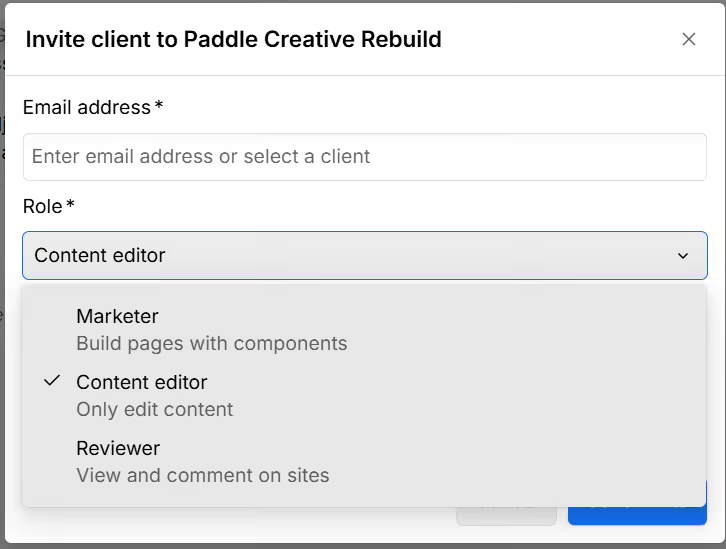
No, existing users will not lose access to their website. From 4 May 2026, Webflow will automatically migrate all legacy Editor users to a free Client Seat and assign the Content Editor role. This process requires no manual action and is designed to preserve your current editing permissions whilst introducing a more capable set of tools.
This role is designed to be the direct equivalent of your current permissions, with more flexibility and better tools.
You don’t need to do anything to keep editing your site.
8. What Are the New Webflow User Roles?
Instead of one-size-fits-all access, we can now tailor permissions to your team's specific needs:
- Content Editor (Your Default Role): Best for routine updates. Edit text, images, and CMS items with total design safety.
- Marketer: For teams who want to move faster. This role allows you to build new landing pages using the Components we’ve already designed for your brand.
- Reviewer (Free): Ideal for stakeholders. They can browse the site and leave comments, but they cannot change content.
This system ensures your team can work efficiently without risking the design or structure of your website.
9. What Can You Do in Webflow Edit Mode?
The new editing experience introduces several features that weren’t available before.
You can now:
- Manage your media in a dedicated Assets panel
- Edit SEO alt text directly on images
- Collaborate with your team in real time
- Edit content directly on the page (not just in CMS fields)
- Work across multiple languages (if enabled)
- See who else is editing to avoid overlap
It also introduces a more secure way of working, with individual user access and clearer visibility over who is making changes.
Paddle Creative Insight: One of the biggest advantages of Client Seats is that we can now involve clients earlier in the build process. Previously, content entry had to wait until hosting was live. Now, teams can begin populating CMS content during development, significantly reducing time to launch.
10. Why Is Webflow Retiring the Legacy Editor?
The legacy Editor was built for a simpler version of the web. As teams and websites have evolved, Webflow needed a system that could:
- Support better collaboration
- Offer more flexibility
- Provide stronger permissions and security
The new role-based system replaces the old “one-size-fits-all” approach with a far more scalable and future-proof solution.
11. What This Means for You as a Paddle Creative Client
We’re managing this transition for you – so you don’t have to worry about the technical details.
Here’s what you can expect from us:
Proactive migration
We’re moving clients to the new system early to avoid last-minute changes.
Built-in safety
Your site is built using structured components, so your team can update content without breaking layouts.
Faster workflows
You’ll be able to create and update content more efficiently than before.
Earlier collaboration
We can involve your team earlier in the process – allowing content to be added while the site is still being built, helping projects launch faster.
Ongoing support
We’ll guide you through the new system and answer any questions along the way.
12. Key Concepts
Webflow Edit Mode Webflow's replacement for the legacy Editor, built directly into the platform canvas rather than functioning as an overlay on the live site. Edit Mode enables native on-page content editing with direct access to assets, SEO controls, real-time collaboration, and on-page commenting – without conflicting with custom code or site performance.
Client Seats Role-based access permissions in Webflow that allow team members to edit content without accessing technical design features. Client Seats are site-specific, enabling secure and focused collaboration. From May 4, 2026, all legacy Editor users are automatically migrated to a free Client Seat.
Content Editor Role The default role assigned to users during the Edit Mode migration. It allows team members to manage text, images, and CMS data – such as blog posts, case studies, and team pages – while maintaining strict design protections that prevent accidental layout changes.
Design Guardrails The structured component system Paddle Creative uses to protect your site's design integrity when your team edits content. Guardrails ensure that Content Editors can update copy, swap images, and manage CMS items freely without risking the underlying layout, brand consistency, or custom code.
Marketer Role An elevated Webflow user role that goes beyond the Content Editor's permissions. Marketers can build new landing pages using pre-designed brand components, giving marketing teams the ability to move faster without requiring developer involvement – while staying within approved design boundaries.
Legacy Editor Webflow's original content editing interface, which functioned as a separate overlay on top of the live site. While simple to use, it caused compatibility issues with animations, custom code, and modern integrations. The Legacy Editor is permanently retired on August 4, 2026.
Need Help or Have Questions?
We’ll be rolling this out across all Paddle Creative client projects.
If you’d like:
- Early access to the new system
- A walkthrough for your team
- Help setting up roles and permissions
Get in touch with us, and we’ll guide you through the transition.
Author
Fact Checked By

%20(1).avif)






.avif)

%20(1).avif)
%20(2).avif)
%20(1).avif)
.avif)
.avif)
%20(1).avif)
.avif)
.avif)
.avif)
.avif)
.avif)
.avif)
%20(1).avif)
.avif)
%20(1).avif)

.avif)

%20(1).avif)
%20(1).avif)
%20(1).avif)




%20(2).avif)
.avif)


.avif)

.avif)
.avif)
.avif)
.avif)
.avif)
.avif)
.avif)
%2520(1).avif)
%2520(1).avif)
.avif)
%2520(1).avif)
%2520(1).avif)
%2520(1).avif)
%2520(1).avif)
%2520(1).avif)
%2520(1).avif)
.avif)
.avif)


4.avif)
